YouTube Launches Seasons & Episodes Feature — Looks Just Like Netflix
YouTube Partner Program creators can now structure playlists into Seasons and Episodes across TV, mobile, and desktop. The interface is nearly identical to Netflix, and viewers can pick up right where they left off on any device.
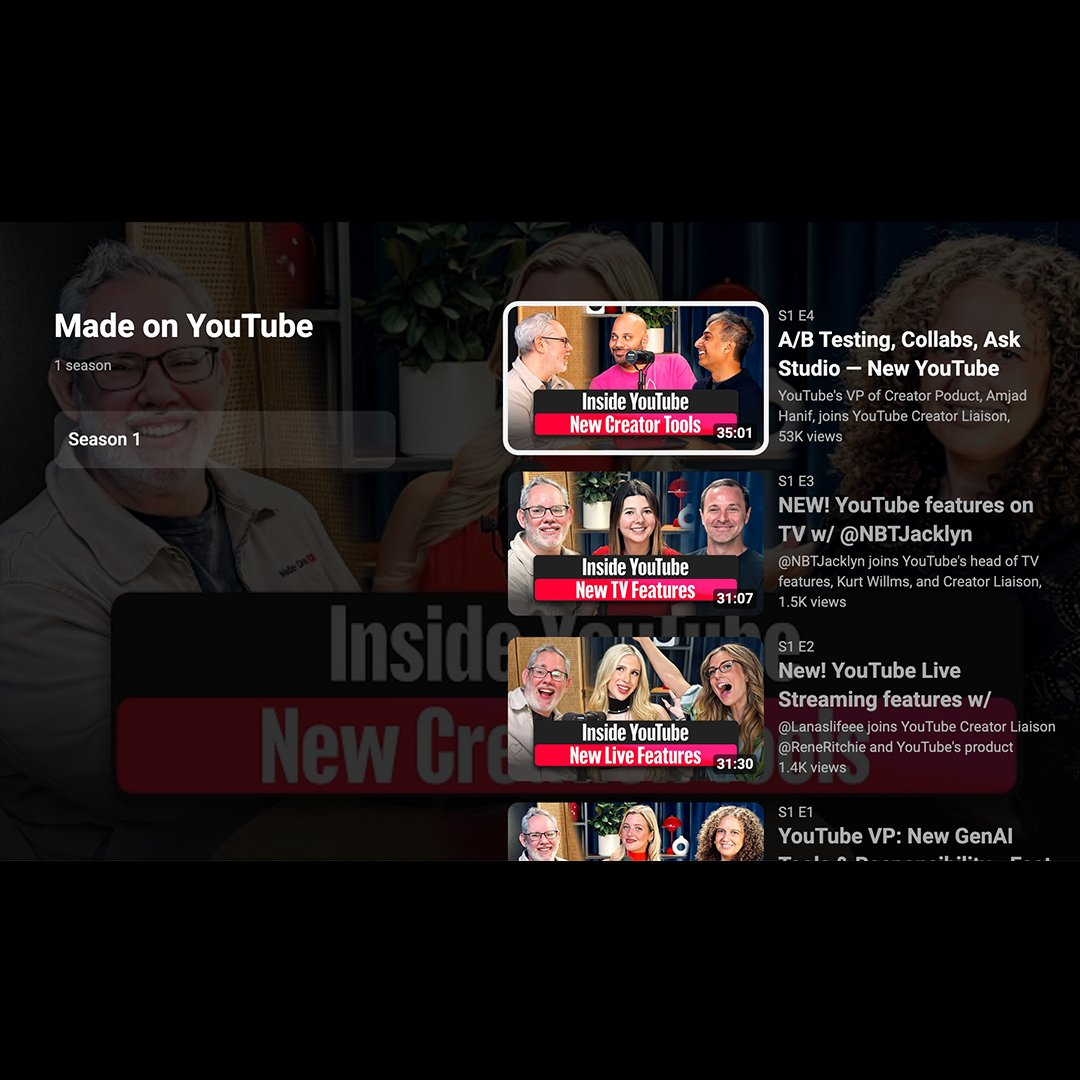
YouTube's new Season & Episode playlist view — nearly identical to Netflix's series browsing UI.
“We're making it easier to watch series organized by seasons and episodes. YouTube Creators in the YouTube Partner Program can now structure playlists into series with seasons and episodes across TV, mobile and desktop. That means you can easily browse and pick up right where you left off.”
What You Need to Know
Available to
YouTube Partner Program creators
Platforms
TV, mobile & desktop
Resume playback
Yes — cross-device
Announced
July 9, 2026
Feature Breakdown
YouTube's Seasons & Episodes feature turns any playlist into a full TV-show experience. Here is what the update includes:
Season & Episode structure
Organize playlists into numbered seasons and episodes, just like a traditional TV show.
Cross-device resume
Viewers can pick up right where they left off — seamlessly switching between TV, mobile, and desktop.
Serial & non-serial modes
Choose whether your show requires in-order viewing or whether episodes can be watched independently.
Netflix-identical UI
The browsing interface mirrors Netflix's season-select layout — familiar to anyone who uses streaming services.
Polished TV experience
YouTube describes this as giving creators a 'polished TV experience for your series' — built for the living room.
Who Can Use It & What Counts as a Show
The feature is gated behind the YouTube Partner Program. To qualify, a channel must meet YPP thresholds (1,000 subscribers, 4,000 watch hours or 10M Shorts views). Beyond the YPP requirement, YouTube defines a qualifying “show” with the following criteria:
- Consistent characters or hosts across every episode
- Same intro format used throughout the series
- Consistent thumbnail style and formatting
- Clear thematic connection between all episodes
- Creator must be enrolled in the YouTube Partner Program
Creators can also choose between serial (watch in order) and non-serial (standalone episodes) modes depending on their content format.
Why This Matters for Creators
YouTube has been steadily taking market share from traditional TV — it surpassed Netflix in US living-room watch time in 2024 and has held that position. The Seasons & Episodes feature is the next logical step: making creator content feel at home on the biggest screen in the house.
For streamers and video creators, this opens up a structured content format that was previously only available to premium subscription shows. Podcast series, interview shows, documentary-style content, gaming retrospectives, and any episodic format can now be presented with a polished, Netflix-grade UI — without leaving YouTube.
The cross-device resume feature is particularly valuable for long-form content: a viewer who starts an episode on their phone commuting can finish it on the TV at home, with no friction.
How to Set Up Seasons & Episodes
- 1Go to YouTube Studio and navigate to Playlists.
- 2Open an existing playlist or create a new one.
- 3Click Edit → Show type → select "Show".
- 4Assign Season numbers and Episode numbers to each video.
- 5Set serial or non-serial order based on your content.
- 6Save — the Netflix-style layout goes live immediately for viewers.
See It in Action
YouTube's own “Made on YouTube” and “Inside YouTube” series are already using the new format — you can browse them right now to see what the Season & Episode UI looks like for your audience.
Official Announcement — @UpdatesFromYT
x.com · July 9, 2026