Self-Moving, Smart & Electronic Chess Boards
An electronic chess board reads the real pieces you move and sends the game to Chess.com, Lichess or an engine; a self-moving board goes one step further and moves your opponent's pieces for you. Below are four self-moving boards from $499 to $1,250, six electronic boards from $183 to $630, and a table of which ones actually connect to Chess.com.
Prices and picks checked . Prices move — treat them as a guide, not a quote.
Amazon links on this page are affiliate links: we earn a commission if you buy, at no extra cost to you.
What Is a Self-Moving Chess Board?
A self-moving chess board plays your opponent's moves for them. A magnet or robotic arm underneath the surface catches each piece from below and slides it across the squares, so a move arriving from Chess.com — or from the engine built into the board — happens physically in front of you. The pieces are ordinary; every moving part is hidden under the board, which is exactly why the effect looks like magic.
A smart or electronic chess board does only half of that. It senses which piece you moved and relays it to an app, but nothing moves on its own — you push both sides yourself. Electronic boards start under $200. Self-moving boards start at $499, and that gap is the robotics.
Both are sometimes called “automatic” chess boards by sellers, which is why so many buyers end up with the wrong one. If the listing does not explicitly say the pieces move by themselves, they do not.
Self-Moving Chess Boards
Every board in this group physically moves its own pieces. Prices are what the linked store charged in September 2026 and all four regularly discount, so the ranking below is about what they do, not this week's sticker.
Chessnut Move
Robotic, self-moving

The self-moving board that also plays properly online. Your Chess.com or Lichess opponent's moves play out on the board through the Chessnut app, moves average under three seconds, and built-in Stockfish lets you play the board with no phone at all.
Pros
- • Chess.com and Lichess via the Chessnut app
- • Moves average under 3 seconds
- • Built-in Stockfish, no phone needed
- • Moves several pieces at once to reset
Cons
- • Wooden set costs $799
- • Large footprint
Miko Chess Grand
Robotic, self-moving
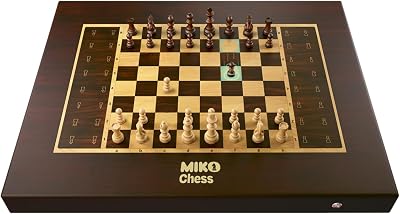
The lowest price anyone currently charges for pieces that move themselves. Tap auto-reset in the app and every piece returns to its square; 20+ adaptive AI levels, and it connects to Chess.com, Lichess and Chess24. Formerly sold as Square Off.
Pros
- • Cheapest self-moving board
- • Automatic post-game reset
- • Chess.com, Lichess and Chess24
- • About 30 games per charge
Cons
- • Sold out at Miko, preorder for delivery before Christmas
- • Big: 23.7 × 19 in, 11.9 lb
Miko Chess Grand — Harry Potter Edition
Robotic, self-moving
- Price
- $649
- Type
- Robotic, self-moving
- Best for
- The wizard chess gift
- Buy from
- Miko
The licensed Harry Potter board, and the reason this whole category went viral. Same self-moving hardware as the Grand with Hogwarts-themed pieces and a 3380+ Elo engine. Dark blue is $649, black is $699.
Pros
- • Officially licensed Harry Potter
- • Pieces move on their own
- • 3380+ Elo engine, 20 levels
- • Voice-activated moves
Cons
- • Preorder — delivery from October 15, 2026
- • No Chess.com or Lichess integration listed
Phantom Chess
Robotic, self-moving
- Price
- $849
- Type
- Robotic, self-moving
- Best for
- Furniture-grade wood
- Buy from
- Phantom
Solid walnut and maple with the magnet mechanism hidden completely, so nothing on the surface explains how the pieces move. A 21-inch board that plays Chess.com and Lichess opponents, or the person sitting opposite you.
Pros
- • Real walnut and maple
- • No visible hardware
- • Chess.com and Lichess
- • Battery-powered, wireless
Cons
- • $849 to $1,250 depending on set
- • Pieces sold separately from $200
Best Electronic Chess Boards (Smart Boards That Read Your Moves)
An electronic chess board — also sold as a smart, digital or e-board — is a real board with sensors under the squares. It records every move you make, sends it to Chess.com, Lichess or a built-in engine, and shows the reply with LEDs on the squares so you move your opponent's piece by hand. Most also save over-the-board games so you can analyse them later.
They cost a third to a half of a robotic board, they are far faster for blitz, and for streaming they are genuinely the better tool. Four of the six below play online; the last two are offline chess computers for players who just want an opponent.
Chessnut Evo
Electronic, standalone
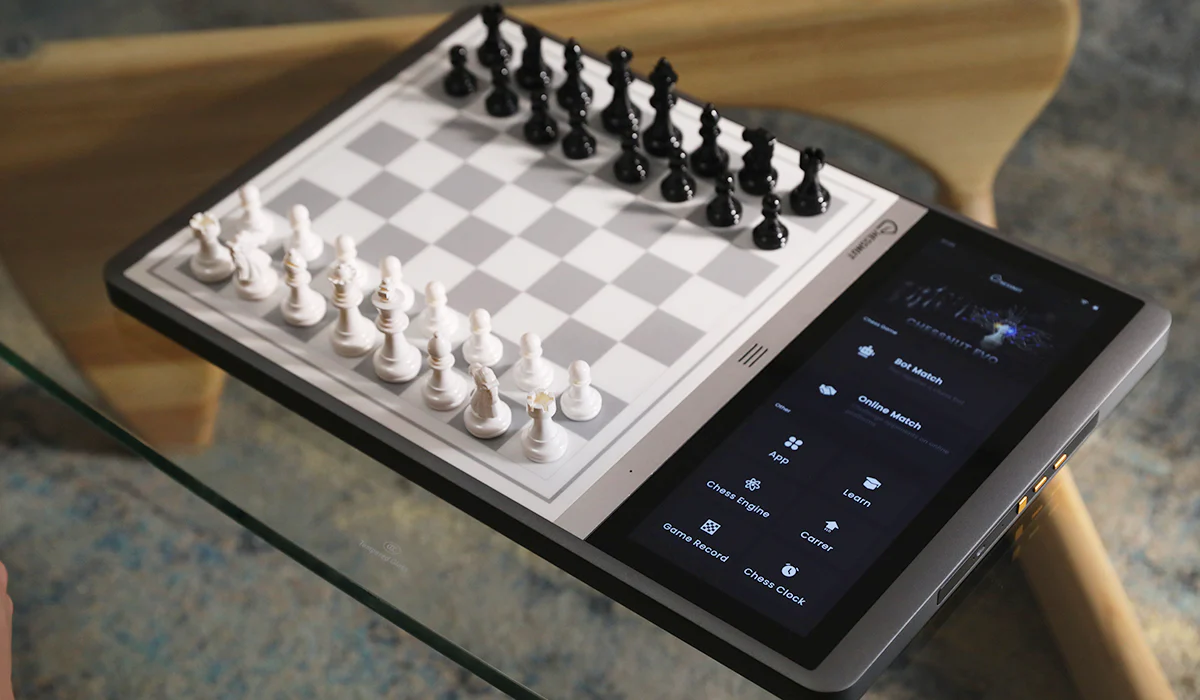
A 12.3-inch touchscreen and Wi-Fi built into the board, so Chess.com and Lichess run on the board itself with no phone in the loop. Stockfish (Elo 600–3190) and the human-like Maia engine (Elo 1100–1900) are built in, and RFID reads every piece.
Pros
- • Standalone — no phone needed
- • Stockfish and Maia built in
- • 12.3-inch touchscreen
- • RFID full piece recognition
Cons
- • Pieces do not move themselves
- • Priciest electronic board here
ChessUp 2
Electronic, Wi-Fi
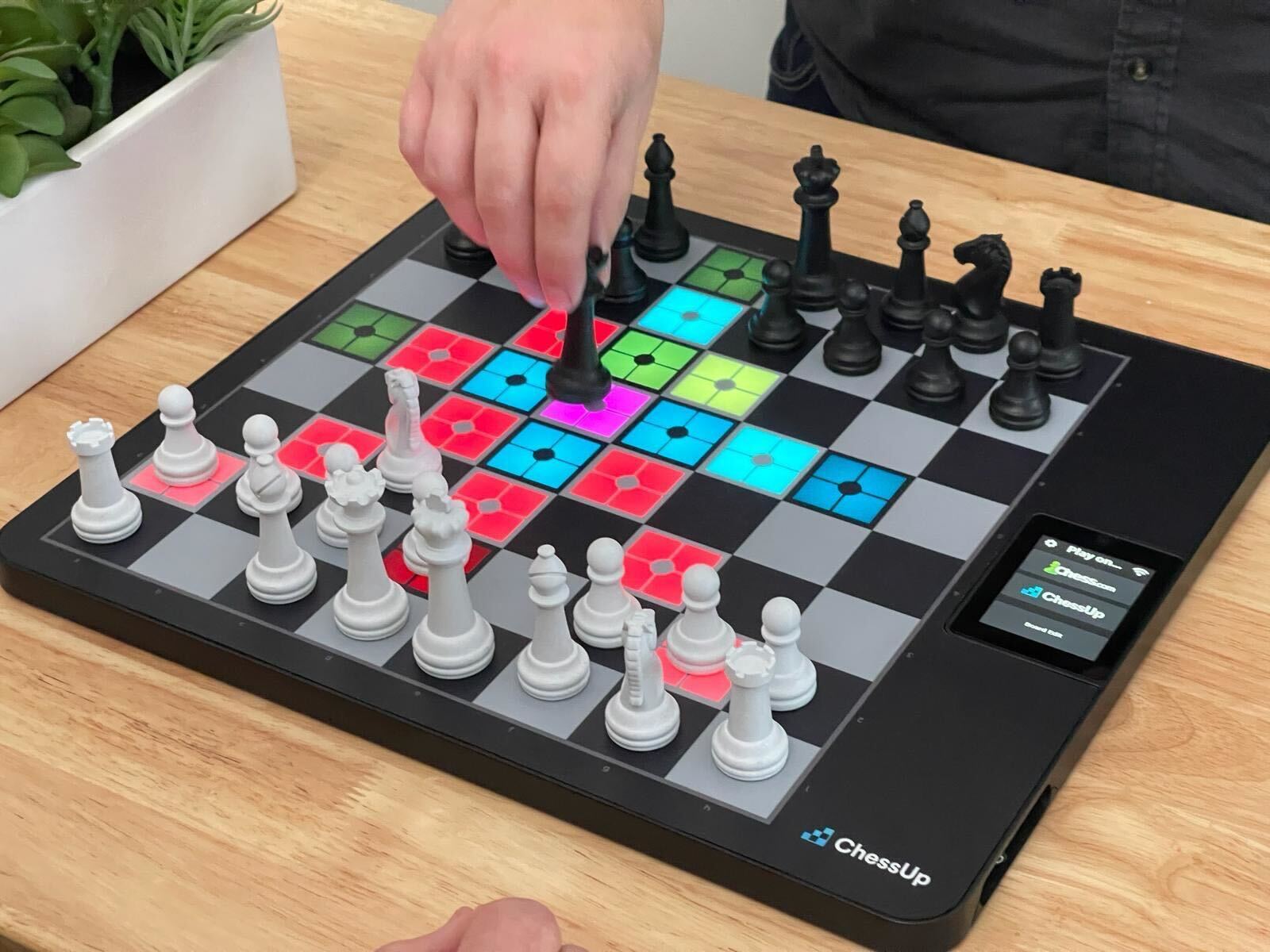
Touch a piece and the squares light up its legal moves, then colour-code how good the move you played was. Built-in Wi-Fi connects straight to Chess.com and Lichess, and the assistance level can be set per player — useful when a parent plays a child.
Pros
- • Chess.com and Lichess over Wi-Fi
- • Move-quality coaching lights
- • Per-player hint levels
- • No phone needed to play online
Cons
- • Pieces do not move themselves
- • Gaming aesthetic
Chessnut Air
Electronic, Bluetooth
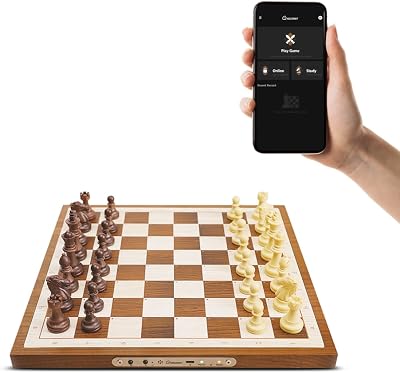
The cheapest board here that plays Chess.com and Lichess with real pieces. A 13-inch wooden board, 0.7 inches thin, that talks to the Chessnut app over Bluetooth; hidden LEDs show your opponent's move, and it stores 20 over-the-board games for later review.
Pros
- • Chess.com and Lichess via the app
- • Full piece recognition
- • Stores 20 over-the-board games
- • Thin enough to travel
Cons
- • Needs a phone or PC running the app
- • Smaller than tournament size
Chessnut Pro
Electronic, wooden

A 540 mm wooden board with 55 mm squares and wooden pieces, sensors hidden entirely — the closest thing to a tournament board at home while your games run on Chess.com or Lichess through the Chessnut app.
Pros
- • 55 mm tournament squares
- • Wooden board and pieces
- • Chess.com and Lichess via the app
- • Hidden LED move lights
Cons
- • Needs the app for online play
- • Heavy and not portable
DGT Centaur
Offline AI opponent
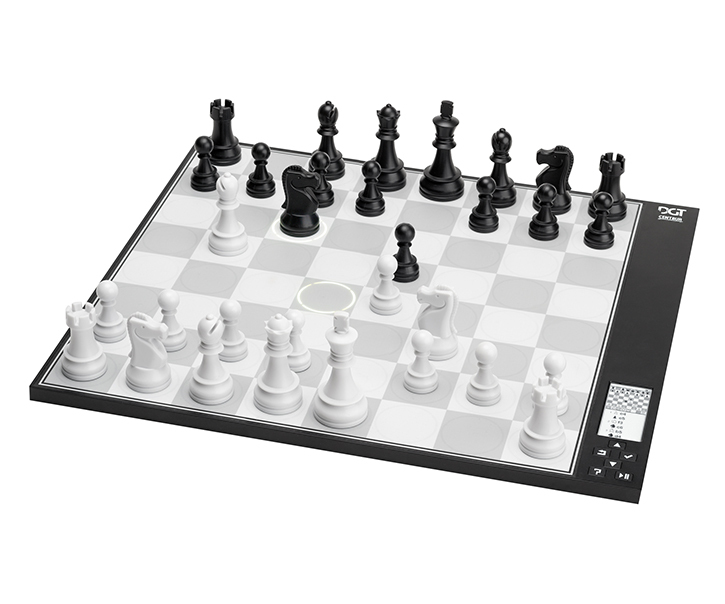
An e-paper display and an adaptive engine that tunes itself to your strength, on a 17.5 × 15.8 inch board with 48 mm squares and weighted pieces. Nothing to connect and nothing to configure — it is a chess opponent, not a peripheral.
Pros
- • Adaptive engine for practice
- • No setup at all
- • E-paper display
- • Weighted pieces
Cons
- • Cannot play online at all
- • Pieces do not move themselves
Millennium ChessGenius Pro
Offline chess computer
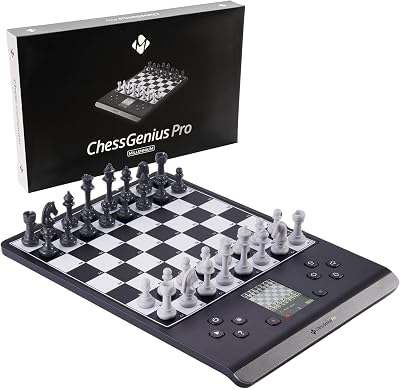
The cheapest way to get a real board that plays back. Richard Lang's ChessGenius engine adapts up to 2200+ Elo, a colour display shows the game, and a built-in trainer gives hints and takebacks. It is a 20 cm travel board with press-down sensors, and it never goes online.
Pros
- • Under $200
- • 2200+ Elo adaptive engine
- • Hints and takebacks
- • Travel size
Cons
- • Offline only — no Chess.com or Lichess
- • Press-down sensors, not piece recognition
Quick Comparison: All Boards
| Product | Type | Price | Best For | Rating |
|---|---|---|---|---|
| Chessnut Move | Robotic, self-moving | $719 | Online play with moving pieces | 5.0 |
| Miko Chess Grand | Robotic, self-moving | $499 | Cheapest way into self-moving | 4.0 |
| Miko Chess Grand — Harry Potter Edition | Robotic, self-moving | $649 | The wizard chess gift | 4.0 |
| Phantom Chess | Robotic, self-moving | $849 | Furniture-grade wood | 4.0 |
| Chessnut Evo | Electronic, standalone | $630 | Online play without a phone | 5.0 |
| ChessUp 2 | Electronic, Wi-Fi | $430 | Learning and improving | 5.0 |
| Chessnut Air | Electronic, Bluetooth | $250 | Cheapest board that plays Chess.com | 4.0 |
| Chessnut Pro | Electronic, wooden | $649 | Tournament feel on camera | 5.0 |
| DGT Centaur | Offline AI opponent | $329 | Practice with no internet | 4.0 |
| Millennium ChessGenius Pro | Offline chess computer | $183 | Cheapest board that plays you | 4.0 |
Which Electronic Chess Boards Work With Chess.com and Lichess?
Chess.com's help center confirms the site supports electronic boards, but it leaves compatibility to each manufacturer — in practice the board maker's app, a Wi-Fi connection on the board, or a browser extension does the linking. This is what each maker states for its board.
| Board | Pieces move | Chess.com | Lichess | Plays you without a phone |
|---|---|---|---|---|
| Chessnut Move | Yes | Yes, via Chessnut app | Yes, via Chessnut app | Built-in Stockfish |
| Miko Chess Grand | Yes | Yes, via Miko app | Yes, via Miko app | — |
| Miko Harry Potter Edition | Yes | Not listed | Not listed | — |
| Phantom Chess | Yes | Yes | Yes | — |
| Chessnut Evo | No | Yes, on the board | Yes, on the board | Stockfish + Maia |
| ChessUp 2 | No | Yes, built-in Wi-Fi | Yes, built-in Wi-Fi | Built-in engine |
| Chessnut Air | No | Yes, via Chessnut app | Yes, via Chessnut app | — |
| Chessnut Pro | No | Yes, via Chessnut app | Yes, via Chessnut app | — |
| DGT Pegasus | No | Via Chessconnect extension | Yes, DGT Chess app | — |
| DGT Centaur | No | No | No | Adaptive engine |
| Millennium ChessGenius Pro | No | No | No | 2200+ Elo engine |
DGT boards use DGT's free Chessconnect extension to reach Chess.com and Lichess from Chrome, and it now runs on iPhone and iPad as well. The DGT Pegasus itself is sold through DGT dealers rather than Amazon US, where it was out of stock when we checked.
What to Look For in an Electronic Chess Board
How it recognises pieces
Full piece recognition (Chessnut, ChessUp, DGT) puts a chip in every piece, so the board knows which piece stands on which square and you can set up any position. Press-down sensor boards like the Millennium ChessGenius Pro only detect that a square was pressed and rely on you starting from the normal setup — cheaper, but less forgiving. Those per-piece chips, plus the sensor grid under all 64 squares, are most of why a good electronic board costs several hundred dollars.
How it connects
Wi-Fi boards (Chessnut Evo, ChessUp 2) play online by themselves. Bluetooth boards (Chessnut Air, Pro, Move, Miko) need the maker's phone app running for the whole game — fine at a desk, one more battery to watch on a long session. Offline computers never connect at all.
Size
The Chessnut Pro has tournament-size 55 mm squares. A 13-inch board like the Chessnut Air fits a desk and a bag. The 20 cm ChessGenius Pro is a travel board — a good opponent, a poor camera subject.
DGT or Chessnut?
DGT is the tournament name — it supplies boards for live broadcasting in cooperation with FIDE, and its home boards lean on Lichess plus the Chessconnect extension. Chessnut is the easier buy for Chess.com players: its app connects to both platforms and the Evo does it without a phone.
How Much Does a Self-Moving Chess Board Cost?
$499 buys the cheapest one — the Miko Chess Grand. From there, $649–$699 gets the licensed Harry Potter edition, $719–$799 gets Chessnut Move depending on whether you want plastic or wooden pieces, and $849–$1,250 covers the in-stock Phantom range in walnut and maple, where the pieces are a separate $200–$450 on top. Nothing credible sells below roughly $450 — listings under that price are sensor boards using the word “automatic” loosely.
The Harry Potter Wizard Chess Board
The reason searches for self-moving chess boards went from a few hundred a month to tens of thousands is a licensed Harry Potter board. Miko's Chess Grand Harry Potter Edition uses the same self-moving hardware as the standard Grand with Hogwarts-themed pieces, a 3380+ Elo engine and voice-activated moves, at $649 for dark blue and $699 for black. Two honest caveats before you buy it as a gift: it ships as a preorder from October 15, 2026, and Miko lists only Bluetooth to its own app for this edition rather than Chess.com or Lichess. If the budget stops short, the GoChess Harry Potter set (about $350) has the wizard-chess pieces and plays Chess.com and Lichess, but its pieces stay put — it lights up moves instead. And no, on neither board do the pieces destroy each other.
Self-Moving vs Electronic: Which Should You Actually Buy?
Buy self-moving if the board is the point — a gift, a living-room object, or playing a distant opponent across a real board. Buy an electronic board if chess is the point. They are cheaper, respond instantly, and never desync in blitz, because they only have to read one move instead of executing two. A robotic board spends a couple of seconds per reply, which is pleasant in a classical game and unworkable in bullet. Put crudely: self-moving boards are better to own, electronic boards are better to play on.
Using an Electronic Board on Stream
The standard chess-streamer layout is three OBS sources: the Chess.com or Lichess browser window that the board syncs automatically, a top-down board cam over the physical pieces, and a face cam. Light the board from two sides at an angle rather than straight above, which puts glare on glossy pieces, and mute the board's move beeps if it has a speaker. Standalone boards like the Chessnut Evo beat Bluetooth-to-phone setups over a multi-hour session — no phone battery to die mid-game. Our chess streaming guide covers the full OBS scene. A second camera covers the board cam, a pair of LED panels handles the lighting, and a stream deck switches scenes so your hands stay on the pieces.
Frequently Asked Questions
What is the best electronic chess board?
For most people the Chessnut Evo: it runs Chess.com and Lichess on its own built-in screen over Wi-Fi, has Stockfish and Maia engines inside, and needs no phone. ChessUp 2 is the better pick for a learner because its lights grade every move, the Chessnut Air is the cheapest board that plays Chess.com, and the DGT Centaur is the pick if you only want to play a computer offline.
Which electronic chess boards work with Chess.com?
Chessnut Evo and ChessUp 2 connect to Chess.com directly over Wi-Fi. Chessnut Air, Chessnut Pro and Chessnut Move connect through the Chessnut app, Miko Chess Grand through the Miko app, and DGT boards through DGT's free Chessconnect browser extension. Chess.com's own help center confirms it supports electronic boards but tells you to check compatibility with the manufacturer, so the maker's app is what actually links the two.
What is the cheapest smart chess board?
The Millennium ChessGenius Pro, at about $183 on Amazon in September 2026, is the cheapest board here that plays you — but it is offline only. The cheapest board that plays Chess.com and Lichess with real pieces is the Chessnut Air at about $250. Chessnut's smaller Chessnut Go costs less still, but Chessnut lists only Lichess and ValChess for it, not Chess.com.
Is there an electronic chess board that plays against you?
Yes. The DGT Centaur and Millennium ChessGenius Pro are chess computers with the engine inside the board. The Chessnut Evo has Stockfish and Maia built in, and the self-moving Chessnut Move plays you with built-in Stockfish and moves its own pieces. Boards like the Chessnut Air and Pro also play an engine, but through the phone app.
How much does a self-moving chess board cost?
Between $499 and $1,250 as of September 2026. The Miko Chess Grand is the cheapest at $499, Chessnut Move runs $719 for plastic pieces and $799 for wooden, the Harry Potter edition is $649 to $699, and Phantom Chess spans $849 to $1,250 for in-stock sets. Anything advertised far below $499 is a sensor board, not a self-moving one.
What is the difference between a self-moving board and a smart chess board?
A smart or electronic board only reads your moves and relays them to an app — the pieces sit still and you move both sides yourself, following LED lights for your opponent's move. A self-moving board reads your move and then physically plays the reply. Electronic boards start under $200; self-moving boards start at $499, and that gap is the entire robotics mechanism.
Is there a real wizard chess board like in Harry Potter?
Yes. Miko sells an officially licensed Harry Potter edition of the Chess Grand where the pieces glide across the board on their own, priced at $649 for dark blue and $699 for black, as a preorder with delivery from October 15, 2026. A cheaper licensed GoChess Harry Potter set sells for about $350, but its pieces do not move — it is a light-up electronic board.
Can a self-moving chess board reset itself after a game?
Yes on the two most common ones. The Miko Chess Grand and its Harry Potter edition return every piece to its starting square when you tap auto-reset in the app, and the Chessnut Move can move several pieces at once to set up a new game or a study position quickly.
Are electronic chess boards allowed for rated online games?
Generally yes — a board is an input device, like a mouse, and you still choose your own moves. Engine assistance remains forbidden in any form. If you play titled or prize events, read the fair-play policy of the platform first, because rules differ for money games.
Which chess board is best for streaming on Twitch or YouTube?
An electronic board beats a self-moving one on stream. Your moves sync to Chess.com or Lichess in real time so the normal browser overlay, evaluation bar and chat predictions keep working, and a top-down board cam shows the physical pieces. Self-moving boards look spectacular on camera but add seconds per move, which hurts blitz.