Multitwitch: How to Watch Multiple Twitch Streams at Once
By Mira Okonkwo··10 min read
To watch multiple Twitch streams at once, open a multistream viewer, add the channel names, and it plays them side by side in one browser tab. The quickest route is our free Multiwatch: type streamer.guide/multi/xqc,shroud into the address bar and both channels open in a split screen. It also mixes in Kick and YouTube streams, which the original MultiTwitch.tv cannot.
Below: the exact URL format, which multitwitch sites still work in September 2026, and how to handle the three things that go wrong with a grid — audio, chat and bandwidth.
Multiwatch — free multistream viewer
Twitch, Kick and YouTube in one grid, up to nine streams in a 3×3 layout. No sign-up, no extension. Your lineup is saved in the URL, so a bookmark brings it back.
Open Multiwatch- Watch several streams in five steps
- 1Open Multiwatch. Go to streamer.guide/tools/multiwatch. There is no account, extension or download.
- 2Add each stream. Pick Twitch, Kick or YouTube, type the channel name (for YouTube, paste the live video's URL or ID) and press Add Stream. Repeat for every channel you want.
- 3Open the grid. Click Watch. The streams open full-screen in one tab: two side by side, three or four in a 2×2 grid, up to nine in a 3×3 grid.
- 4Choose the one you hear. Twitch tiles start muted. Unmute the tile you want to follow with its own volume control and leave the others silent.
- 5Bookmark the address. The URL now holds your lineup, for example streamer.guide/multi/t:xqc,k:trainwreckstv. Bookmark it or send it to a friend to reopen the same grid.
The Multiwatch URL Format
The form on the Multiwatch page only builds an address, so once you know the pattern you can type it directly, the same way people have always used multitwitch.tv. Channels are separated by commas, and each one can carry a one-letter platform prefix:
| Prefix | Platform | What goes after it | Example |
|---|---|---|---|
| t: | Twitch | Channel name from twitch.tv/… | t:shroud |
| k: | Kick | Channel name from kick.com/… | k:trainwreckstv |
| y: | YouTube | The live video's 11-character ID | y:jfKfPfyJRdk |
| none | Twitch | A bare name is read as Twitch | xqc,shroud |
A mixed lineup looks like streamer.guide/multi/t:xqc,k:trainwreckstv,y:jfKfPfyJRdk. The grid sizes itself to the number of streams: two side by side, three or four in 2×2, five or six in 3×2 and up to nine in 3×3. There is no hard cap — past nine it switches to four columns — but tiles get small fast.
To change the lineup, edit the URL, or click the gear icon in the top-right corner of the grid to go back to the builder and add the streams again. The grid is video only: it does not show chat, and it has no synced playback or drag-to-rearrange. The sections on chat and audio below cover the workarounds.
Does MultiTwitch.tv Still Work?
Yes. We loaded it on September 26, 2026: multitwitch.tv/channel1/channel2 still returns working Twitch players, sized automatically to fill the window, with a tabbed chat panel on the right and “Change Streams” and “Toggle Chat” links in the bottom corner. It is the original multitwitch, written by Brian Hamrick, and its code is public on GitHub.
What it does not do is anything beyond Twitch. If the people you watch have spread across Kick and YouTube, the old site cannot help — that is the main reason to move to a cross-platform viewer. Note also that MultiTwitch.live is a different site, run by the WizeBot team, not a newer version of MultiTwitch.tv.
Multitwitch alternatives that still work
Every site below was up and serving its viewer when we checked on September 26, 2026.
| Viewer | Platforms | How you add streams | Chat | Worth knowing |
|---|---|---|---|---|
| Streamer.Guide Multiwatch | Twitch, Kick, YouTube | streamer.guide/multi/xqc,shroud | No — video only; use pop-out chat | Mixes platforms in one grid; lineup lives in the URL |
| MultiTwitch.tv | Twitch | multitwitch.tv/xqc/shroud | Yes, one tab per channel | The original; open source, auto-sizes the players |
| Kadgar | Twitch | kadgar.net/live/xqc/shroud | Yes | Same slash-separated idea as MultiTwitch |
| TwitchTheater | Twitch, YouTube, a few others | twitchtheater.tv/xqc/shroud | Yes, several at once | Adjustable columns; advertises mobile support |
| Multistre.am | Twitch | Form on the home page | In some layouts | Pick a layout for up to 8 streams |
| MultiTwitch.live | Twitch | Built on the page, shared from the address bar | Yes | Run by WizeBot; players and chats can be moved and resized |
Two more cross-platform players come from our sister sites: the Streams Charts multistream viewer and the Esports Charts Multi-Stream Player. Both add Trovo to Twitch, Kick and YouTube, let you drag streams to reorder them, and the Streams Charts version has a focus layout that enlarges one stream and shrinks the rest — handy when one feed is the main broadcast.
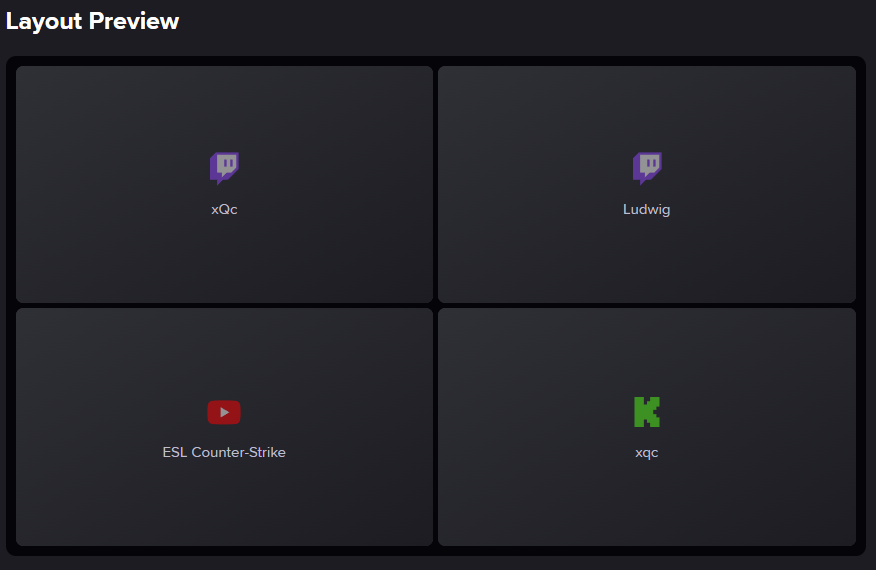
Watching Twitch, Kick and YouTube Together
Most people searching for multitwitch now follow creators on more than one platform, and big events stream everywhere at once. That is where the old Twitch-only sites stop and a cross-platform grid earns its place. Each platform wants a slightly different input:
- Twitch and Kick: the channel name, exactly as it appears after twitch.tv/ or kick.com/.
- YouTube: the ID of the live video, not the channel name or @handle. Open the stream, copy the address (a watch?v=… or youtube.com/live/… link, or the youtu.be link from Share) and paste the whole thing — Multiwatch pulls the 11-character ID out for you. A channel's @handle/live link will not work.
- Embedding off: a YouTube creator can switch off embedding for a stream. That tile then shows an error instead of video, and the only fix is to watch that one on YouTube.
Multiwatch covers Twitch, Kick and YouTube only. TikTok LIVE, SOOP, CHZZK and the other services in our list of livestreaming platforms need their own tab.
Audio: Follow One Stream, Watch the Rest
Four commentators talking over each other is noise, so pick one tile to listen to and keep the others muted. In Multiwatch, Twitch tiles already open muted; use that tile's own speaker icon and volume slider to bring it up. A YouTube tile may sit on a play button until you click it, because browsers block autoplay with sound on pages you have not interacted with yet.
- Switch focus, do not stack. When the action moves to another POV, mute the old tile and unmute the new one. Two voices at half volume is still two voices.
- Use the tile slider, not the system mixer. Windows and macOS see the whole browser as one app, so the system volume mixer cannot pick out a single tile.
- Muted still counts. Twitch's help center says a muted player counts as a viewer as long as live video is playing, so silent tiles are not cheating the streamer out of a view.
Channel Points do not follow you into a grid
Twitch's Channel Points FAQ is explicit: you do not earn points from a Twitch embed on another site, only on the channel page at twitch.tv or in the app. If you are saving points on one channel, keep that channel open in a normal Twitch tab and use the grid for everything else.
Chat With a Multistream Open
Multiwatch gives the whole screen to video, so chat lives in a separate window. Every platform has a pop-out chat you can open from the chat's settings menu, or straight from these addresses — drop the window beside the grid or on a second monitor:
| Platform | Pop-out chat address |
|---|---|
| Twitch | twitch.tv/popout/CHANNEL/chat |
| Kick | kick.com/popout/CHANNEL/chat |
| YouTube | youtube.com/live_chat?v=VIDEO_ID |
If you would rather have chat in the same window, MultiTwitch.tv, Kadgar and TwitchTheater build it in, at the cost of being Twitch-first. And when the streamers you are watching are playing together on Twitch, check whether they turned on Shared Chat: it is part of Twitch's Stream Together collaboration feature and merges the participating channels' chats into one, so a single chat window covers all of them. How streamers set that up is in our co-streaming guide.
Performance and Bandwidth: How Many Streams Is Too Many
Every tile is a separate video your connection downloads and your computer decodes. Twitch's broadcasting guidelines recommend 6,000 kbps for 1080p at 60 fps, so a channel that follows them costs you about 6 Mbps at Source quality. The table assumes that for every tile and a browser in full-screen mode (F11):
| Streams | Grid | Tile on 1920×1080 | Tile on 1366×768 | Download at Source |
|---|---|---|---|---|
| 2 | 2 × 1 | 960 × 1080 | 683 × 768 | ≈ 12 Mbps |
| 3–4 | 2 × 2 | 960 × 540 | 683 × 384 | ≈ 24 Mbps |
| 5–6 | 3 × 2 | 640 × 540 | 455 × 384 | ≈ 36 Mbps |
| 7–9 | 3 × 3 | 640 × 360 | 455 × 256 | ≈ 54 Mbps |
- Drop the quality on side tiles. A 640-pixel-wide tile gains nothing from a 1080p feed. Open the gear icon in each player and set 480p or 720p; keep Source only on the stream you are actually following. For scale, YouTube's help center recommends 5 Mbps for 1080p and just 1.1 Mbps for 480p.
- Mind the 400×300 floor. Twitch's embed documentation says embedded players must be at least 400×300 pixels. A 3×3 grid on a 1366×768 laptop falls under that, so six is the practical ceiling on a small screen.
- Check hardware acceleration. If the grid stutters while your connection is fine, make sure hardware acceleration is enabled in your browser's settings and close other video tabs.
- Stuttering on every tile at once usually means bandwidth; stuttering on one tile usually means that stream's own connection. Close the suspect tile and see whether the rest recover.
Esports: The Main Broadcast Plus Player POVs
Esports is where multi-view pays off most. Big events now stream on several platforms at once: Esports Charts lists VALORANT Champions 2026, running from September 24 to October 18, on Twitch, Kick, YouTube, TikTok, SOOP and CHZZK. A grid that works well for a match:
- 1Official broadcast first, with sound. It is the one with the casters and the replays, so it sets the rhythm of the match.
- 2Player or team POVs, muted. Add the players who stream their own view; the order you type them is the order they fill the grid, left to right.
- 3One co-stream if you want a second voice. Co-streamers rebroadcast the official feed with their own commentary. Keep them muted during play and switch audio to them between maps.
Expect the feeds to drift apart: a co-stream rebroadcasts the official feed with its own extra delay, so a kill can land on one tile seconds before another. For match times and which platforms carry an event, check the tournament schedules on Esports Charts, then bookmark your grid URL once and reuse it for the whole event. If a tile catches a moment worth keeping, open that channel on Twitch to clip it, and see how to download Twitch clips to save the file.
Watching Multiple Streams on Mobile
The Twitch app shows one live stream at a time, and Twitch has no viewer multiview of its own. The closest native features, Stream Together and Shared Chat, are switched on by the streamers, not by you. (Twitch retired Squad Stream, its old four-channel view, in January 2024.)
On a phone, open a multistream viewer in the browser instead: the Multiwatch URL works the same way, and TwitchTheater also advertises mobile support. Turn the phone to landscape and stop at two streams. In portrait, two side-by-side tiles are each only about 200 pixels wide on most phones — far below Twitch's 400×300 minimum and too small to follow.
Watching Multistreams vs Multistreaming
“Twitch multistream” means two different things depending on who is asking. For viewers it is this page: several channels on one screen. For streamers, multistreaming means broadcasting the same live stream to Twitch, YouTube, Kick and others at the same time. If that is what you came for, read how to multistream and compare the services in our multistreaming tools list. The two meet in one place: if a streamer multistreams, you can put their Twitch and Kick feeds side by side in Multiwatch and compare them.
Frequently Asked Questions
Does multitwitch.tv still work?
Yes. As of September 26, 2026, multitwitch.tv/channel1/channel2 still loads working Twitch players with a tabbed chat panel. It is Twitch-only, so if you also want Kick or YouTube in the same grid, use a cross-platform viewer such as Streamer.Guide Multiwatch.
How do I watch multiple Twitch streams at once?
Open a multistream viewer, add the channel names and it plays them side by side in one tab. On Streamer.Guide Multiwatch you can skip the form entirely: type streamer.guide/multi/xqc,shroud into the address bar and both channels open in a split screen. Unmute the one you want to hear.
What is the best MultiTwitch alternative?
For Twitch only, MultiTwitch.tv and Kadgar are the simplest because the channel list goes straight into the URL, and both have chat built in. If the streams you follow are split across Twitch, Kick and YouTube, a cross-platform viewer like Streamer.Guide Multiwatch saves you juggling tabs.
Is MultiTwitch.live the same as MultiTwitch.tv?
No. They are separate sites. MultiTwitch.tv is the original open-source viewer by Brian Hamrick; MultiTwitch.live is run by WizeBot and lets you move and resize the player and chat blocks. Both are Twitch-only.
Is a Twitch multistream the same as multistreaming?
No. A multistream viewer is for watching several channels at once. Multistreaming is a broadcasting term: one streamer sending the same live stream to Twitch, YouTube and Kick at the same time, usually through a service like Restream.
Can I watch Twitch, Kick and YouTube streams in the same grid?
Yes, with a cross-platform viewer. In Streamer.Guide Multiwatch, prefix each entry with its platform: t: for Twitch, k: for Kick and y: for a YouTube video ID, for example streamer.guide/multi/t:xqc,k:trainwreckstv. For YouTube you need the ID of the live video itself, not the channel name.
How many Twitch streams can I watch at once?
Your screen and connection set the limit, not the tool. Twitch's broadcasting guidelines recommend 6,000 kbps for 1080p60, so four channels at Source quality need roughly 24 Mbps and nine need about 54 Mbps. Twitch's embed rules also ask for players of at least 400×300 pixels, which a 3×3 grid on a 1366×768 laptop screen does not meet.
Does a muted stream in a multistream viewer count as a view?
Muting does not remove you: Twitch's help center says a muted player still counts as a viewer as long as live video is playing. Channel Points are different. Twitch's FAQ says you only earn them on the channel page at twitch.tv or in the app, not in a Twitch embed on another site.
Can I watch multiple Twitch streams on my phone?
The Twitch app plays one stream at a time, so use a multistream viewer in your phone's browser instead. Turn the phone to landscape and keep it to two streams; anything more makes each player too small to read.