Streamer Media Kit and Rate Card: What to Include, Where to Get the Numbers, How to Price
By Dan Whitfield··10 min read
A streamer media kit is a one- or two-page summary of your live audience: average concurrent viewers, peak viewers, hours watched, hours streamed, audience country and language, chat activity, past brand work and the formats you sell. Brands buying a live stream care about who is watching right now, not follower counts, so lead with average concurrent viewers. Pair the kit with a rate card, a list of deliverables with a price logic for each. Below are the metrics, where to pull each one, a template to copy, a pricing formula you fill with your own numbers, and the disclosure rules for sponsored streams. We give no market rates, because we found no published source we could verify.
Why a Streamer Kit Differs From an Influencer Kit
An Instagram influencer kit sells reach per post: followers, impressions, engagement rate. A live streamer sells attention over time. The sponsor message is heard once by the people in the stream at that moment, then partly again through clips and VODs. That changes the numbers: concurrent viewers, hours and consistency matter more than followers.
If you are earlier in the journey, start with monetization strategies and affiliate programs for streamers: affiliate links need no media kit, direct sponsorships do.
The Numbers Brands Ask For and Where to Get Them
Use a 90-day window, and state it. Twitch's own Analytics Overview help page defines Average Viewers as the average number of concurrent viewers across all the time streamed in the selected range, Max Viewers as the maximum reached across your streams in that range, and Minutes Watched as total time your live streams were watched. It also offers an Export Data button. YouTube's Analytics API reference defines the equivalents as averageConcurrentViewers and peakConcurrentViewers.
| Metric | Where to find it | Why brands care |
|---|---|---|
| Average concurrent viewers (ACV) | Twitch: Analytics, Average Viewers. YouTube: average concurrent viewers in Studio live metrics. Kick and TikTok: the creator dashboard or LIVE Center. Public cross-check: Streams Charts channel page. | The headline number. It is the audience a sponsor message actually reaches while you talk, so most pricing starts here. |
| Peak viewers | Twitch: Max Viewers. YouTube: peak concurrent viewers. Streams Charts shows peak per channel. | Shows reach on big days. One raid or a viral moment can inflate it, so never lead with it. Show it next to the average. |
| Hours watched (minutes watched) | Twitch: Minutes Watched, divide by 60. YouTube: watch time. Streams Charts: hours watched. | Total attention over a period. Brands use it to compare channels of different sizes and schedules. |
| Airtime (hours streamed) | Twitch: Time Streamed. Streams Charts: airtime. | Tells a brand how many sponsor slots a month you can really deliver, and how consistent you are. |
| Followers and subscribers | Each platform's creator dashboard, plus the public channel page. | Context only. Followers say little about who is live in your chat today, so keep them below the viewer numbers. |
| Chat activity | Twitch: Unique Chatters and Chat Messages. Other platforms: your chat tool or dashboard. | Proof the audience reacts. A chat command or link only works if people talk. |
| Audience geo and language | Twitch: viewer location in Analytics, where available. YouTube: Studio audience tab. Otherwise state your broadcast language and main time zone. | Many offers are country-locked. A brand selling to US buyers needs to know your US share, not your total. |
| Categories and content mix | Your own stream history; Twitch Stream Summary lists each stream. | Brand fit. A hardware sponsor wants tech or gaming; a food brand may prefer just chatting or IRL. |
Dashboards are private, and brands know screenshots can be edited. A public channel page is a neutral cross-check: Streams Charts publishes per-channel viewership history at streamscharts.com/channels/<name>?platform=twitch, for example this Twitch channel page. Link yours in the kit. If your public numbers and your dashboard numbers differ a lot, explain why before the brand finds out.
Be honest about the weak spots. If your peak was a single raid, say so in the template. If your audience is mostly outside the brand's market, say which share is inside it. A brand that finds a gap itself will discount everything else in the kit.
Media Kit Template (Copy and Fill In)
Paste this into a doc or slide and fill the brackets. Keep it to two pages, add your panel art and a dashboard screenshot, and export to PDF. Your colors and fonts should match your channel; see our channel branding and panels guide.
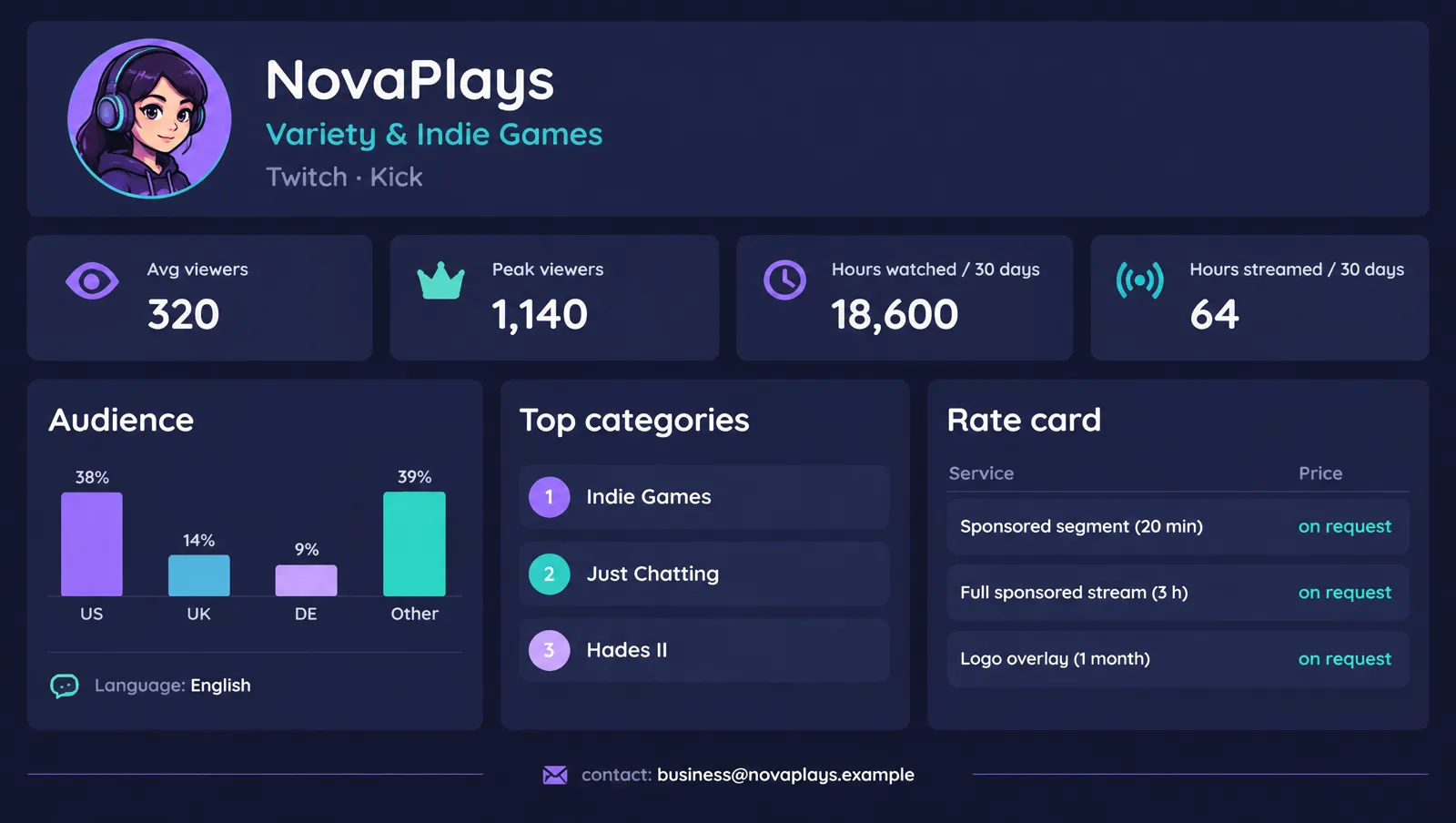
STREAMER MEDIA KIT - [Channel name]
Updated: [Month Year]

1. ABOUT
[Name] streams [category/genre] on [platform] in [language], [days/times + time zone].
One sentence on what makes the stream different. Link: [channel URL]

2. AUDIENCE (last 90 days)
Average concurrent viewers: [number]
Peak viewers: [number] on [date, reason: raid/event/normal]
Hours watched: [number]
Hours streamed per month: [number]
Followers: [number]   Subscribers: [number]
Unique chatters per month: [number]
Top countries: [country 1 xx%, country 2 xx%, country 3 xx%]
Language: [language(s)]
Public stats page: [Streams Charts channel link]
Screenshot of dashboard attached: [yes/no]

3. WHAT I'VE DONE WITH BRANDS
[Brand] - [format] - [one result you can verify, e.g. clip views or code uses]
[Brand] - [format] - [result]
(If none yet: say so and list the formats you can deliver.)

4. WHAT I OFFER
[ ] Sponsored segment inside a stream ([x] minutes)
[ ] Full sponsored stream ([x] hours)
[ ] Logo on overlay / panel ([x] days)
[ ] Chat command or link ([x] days)
[ ] Clip or VOD deliverable
[ ] Exclusivity in [category] for [x] days

5. RATES
See the attached rate card, or: "Pricing starts at [floor fee]; I quote after seeing the brief."

6. DISCLOSURE AND STANDARDS
Every sponsored stream uses the platform's branded content tool and a spoken disclosure, repeated during the stream.
I only promote products I have tried or can honestly describe.

7. CONTACT
[Name / manager] - [business email] - [Discord or X handle]
Tip: click the block once to select all of it, then copy.
Rate Card: What to Sell and How to Price It
We do not publish market rates. We looked for a named, published source for what Twitch, Kick or YouTube streamers charge per stream and found none we could verify, and rates swing with niche, country, brand budget and your audience. So use a formula and plug in your own numbers.
The viewer-hour formula
- Viewer-hours = average concurrent viewers x hours of sponsored airtime. A 20-minute segment at 300 average viewers is 300 x 0.33 = 100 viewer-hours.
- Price = viewer-hours / 1,000 x your rate per 1,000 viewer-hours (R). It works like a CPM, with hours of attention in place of impressions.
- Floor fee: set the lowest price that pays for your prep, the stream itself and any edits. Quote the higher of the formula and the floor.
- Add-ons: usage rights, exclusivity and extra deliverables, priced separately.
Choosing R. Take your target hourly income from sponsored time, divide by your viewer-hours per hour (your average viewers), and scale to 1,000. Then test it: ask two or three brands or peers what they have paid or accepted, and adjust. Use average, not peak, viewers, because the peak is only there for a moment.
| Deliverable | How to price it | Put in the contract |
|---|---|---|
| Sponsored segment (5 to 20 min inside a normal stream) | Viewer-hours of the segment: ACV x segment hours. Multiply by your rate per 1,000 viewer-hours, then check against your floor fee. | The cheapest format and the easiest to sell. Fix a script or talking points, not exact wording. |
| Full sponsored stream | ACV x stream hours, times your rate. Add a premium if the game, schedule or format is chosen by the brand. | Say what happens if the brand's game or product underperforms your usual numbers. Most disputes start here. |
| Overlay or logo placement (days or weeks) | Price by the airtime it covers: ACV x hours streamed while the logo is up, times a lower rate than active talking. | A logo is passive. It is still branded content under Twitch's rules if you are paid. |
| Chat command or link | Flat fee per period, or a smaller flat fee plus performance bonus. | Agree how clicks or code uses will be counted before you start. Platform analytics do not track outside clicks. |
| Clip or VOD deliverable | Separate line item: production time plus a usage-rights fee if the brand will reuse it in its own ads. | Define where the brand may post it and for how long. Reuse in paid ads is a different deal. |
| Exclusivity | Add a premium on top of the deliverable. Your cost is every competing deal you now cannot take for the period. | Name the category and the dates. 'Exclusive in energy drinks for 30 days' beats 'exclusive'. |
Two traps. First, do not price from your best stream: price from your 90-day average, and offer a make-good (an extra segment) instead of a refund if a stream underdelivers. Second, performance-only deals (a code or link with no fee) put all the risk on you. If you accept one, ask for a floor fee as well. On TikTok, creator marketplaces set rates in their own way; see our TikTok One Creator Marketplace guide.
Disclosure: Twitch Rules and the FTC
Put disclosure in the kit and the contract. A brand that does not expect it is a warning sign.
- Twitch. Its Branded Content Guidelines say branded content is anything produced for an exchange of value, such as payment or free goods, and list product placements, sponsored gameplay, paid unboxings, branded panels and logo overlays as examples. If it is a central and intentional part of the stream, you must tick Branded Content under Edit Stream Info in Stream Manager. Twitch then shows a message that the stream “includes paid promotion” when a viewer joins, for 10 seconds. Failing to disclose gets a warning email and, if repeated, can lead to other action including suspension.
- Not required by Twitch: offline panels promoting a sponsor, merch in view without paid promotion, and affiliate links shared in answer to chat questions.
- Prohibited categories. Twitch bans branded content for several categories, including risky gambling products such as online slots, weapons, tobacco and vapes, and certain financial products. Check the brief against the list before you say yes.
- The tool is not enough. Twitch says its tool will not always meet legal obligations; you and the brand must follow the law that applies.
- FTC (US audiences). The FTC's Disclosures 101 says to disclose any material connection, including free products. Place it with the endorsement, not only in a profile or behind a “more” link, use plain words like ad or sponsored, and on live streams repeat it periodically. Full background is on the FTC endorsements page.
In practice: tick the tool, say “this segment is sponsored by [brand]” aloud when it starts, and repeat it when it returns. This guide is not legal advice.
Where to Send the Kit
Do not wait for inbound offers. Pitch brands whose products you already use on stream and attach the kit. Twitch also runs in-dashboard routes: see our write-ups on sponsorships opening to Affiliates and Creator Sponsorship Certification. If you are not yet an Affiliate, our Twitch Affiliate requirements guide shows what to hit first. Refresh the kit every quarter, or after any big change in your numbers.
Frequently Asked Questions
What should a streamer media kit include?
One to two pages with: who you are and what you stream, your average concurrent viewers, peak viewers, hours watched, hours streamed per month, followers, chat activity, audience countries and language, past brand work, the formats you offer, and a contact email. Lead with average concurrent viewers, not followers.
What numbers do brands ask streamers for?
Average concurrent viewers first, then peak viewers, hours watched, airtime, audience country and language, and chat activity. Followers matter less because they do not tell a brand who is watching live. Show a 90-day window so one raid does not distort the picture.
Where do I get my Twitch stats for a media kit?
In the Creator Dashboard Analytics. Twitch's help page lists Average Viewers, Max Viewers, Minutes Watched, Time Streamed, Unique Viewers, Unique Chatters and Chat Messages, and an Export Data button for the chart. For a number a brand can check without logging in to your account, link your public Streams Charts channel page.
How much should I charge for a sponsored stream?
There is no single published market rate we can verify, so we do not give one. Use the formula in this guide: multiply your average concurrent viewers by the hours of sponsored airtime to get viewer-hours, multiply by your own rate per 1,000 viewer-hours, and never go below a floor fee that covers your prep time. Adjust the rate for deliverables, exclusivity and usage rights.
Is a rate card the same as a media kit?
No. The media kit shows who you reach; the rate card lists what you sell and what each item costs. Send the media kit first. Share the rate card when a brand asks for pricing, or put a floor price in the kit and quote the rest after seeing the brief.
Do I have to disclose a sponsored stream on Twitch?
Yes, if branded content is a central and intentional part of the stream. Twitch requires you to use the branded content disclosure tool in Stream Manager, which shows a message that the stream includes paid promotion. Twitch also says the tool will not always satisfy your legal duties, so you and the brand must follow applicable law, such as the FTC's guidance in the US.
What does the FTC say about disclosing sponsorships on a live stream?
The FTC's Disclosures 101 says disclosures should sit with the endorsement where they are hard to miss, and that on live streams they should be repeated periodically so late arrivals still see them. It prefers plain words such as ad, advertisement or sponsored and says free products count as a material connection.
Can I send a media kit if I am a small streamer?
Yes. State your real numbers, show consistency (hours streamed and a steady schedule) and name the formats you can deliver. Small channels with an engaged, niche audience can fit brands that large channels do not. If you are close to Affiliate, our Twitch Affiliate requirements guide covers that path, and Twitch now opens its sponsorship dashboard to Affiliates.